

JWT Authentication in ASP.NET Core 8 is one of the most secure and commonly used methods to protect Web APIs. In this step-by-step guide, you will learn how to implement JWT authentication in ASP.NET Core 8 Web API from scratch.
In our previous tutorial, we built aCRUD Web API using ASP.NET Core 8, SQL Server, and EF Core. But building an API is only half the job.
In real-world applications, security is mandatory.
In this guide, you will learn how to implement JWT Authentication in ASP.NET Core 8 and secure your Web API using role-based authorization.
By the end of this tutorial, you will understand:
- What JWT Authentication is
- How JWT Authentication in ASP.NET Core 8 works
- The difference between authentication and authorization
- How to generate JWT tokens
- How to protect endpoints using [Authorize]
- How to implement role-based authorization
- Best practices for production security
What is JWT Authentication in ASP.NET Core 8?
JWT (JSON Web Token) is a secure way to transmit information between a client and a server.
When we implement JWT Authentication in ASP.NET Core 8, the server generates a token after validating user credentials.
That token is then used to access protected API endpoints.
JWT is:
Why JWT Authentication is Important
- Anyone can access endpoints
- Sensitive data may be exposed
- Malicious users can delete or modify data
- Compliance requirements may be violated
JWT (JSON Web Token) authentication solves these problems. It is stateless, scalable, and secure, making it ideal for modern API design.
JWT vs Traditional Session Authentication
| Feature | JWT | Session-Based Authentication |
|---|---|---|
| Server Storage | None (stateless) | Yes (server memory/database) |
| Scalability | Easy | Hard in distributed systems |
| Mobile-Friendly | Yes | No |
| Security | High if implemented correctly | Medium |
| Use Case | REST APIs, SPAs, Microservices | Traditional MVC websites |
JWT is preferred for APIs because it reduces server load, scales efficiently, and works across platforms without session storage.
You can read more about the differences between .NET Framework, .NET Core & .NET 8
Authentication vs Authorization
Authentication and Authorization are two information security processes. These are two important security processes used to protect our system and data.
1. Authentication
Authentication verifies the identity of a user or service. if user is authenticated then we permit a system access.
Example:
1. The user enters a username and password.
2. The server checks if the credentials are valid.
3. If the credentials are correct, the user is granted access to the system.
2. Authorization
Authorization is a process of verifying what user have access to.
Example:
1. Admin can delete records
2. Normal user can only view data
Authentication happens first. Authorization happens after authentication succeeds.
What is JWT?
JSON Web Token (JWT) is a compact, URL-safe token for securely transmitting information between a client and server.
Key features:
- Stateless: No server session storage required
- Scalable: Works well across distributed systems
- Secure: Can be signed and optionally encrypted
- Cross-platform: Ideal for SPAs, mobile apps, and microservices
JWT is especially popular for APIs because clients and servers can communicate securely without storing session state, which makes it easier to scale applications horizontally.
Structure of a JWT Token
A JWT token has three parts:
Header.Payload.SignatureExample:
eyJhbGciOiJIUzI1NiIsInR5cCI6IkpXVCJ9...1. Header
Contains algorithm and token type.
{
  "alg": "HS256",
  "typ": "JWT"
}2. Payload
Contains claims like:
sub: Subject (user ID)role: User roleiat: Issued at timestampexp: Expiration timestamp
{
  "sub": "1234567890",
  "name": "admin",
  "role": "Admin",
  "department": "IT",
  "iat": 1612309123
}Claims types:
- Registered claims:
sub,exp,iat,aud,iss - Public claims: Custom claims like
Role,Department - Private claims: App-specific claims
3. Signature
The signature ensures the token cannot be tampered with. Modifying the header or payload invalidates the token.
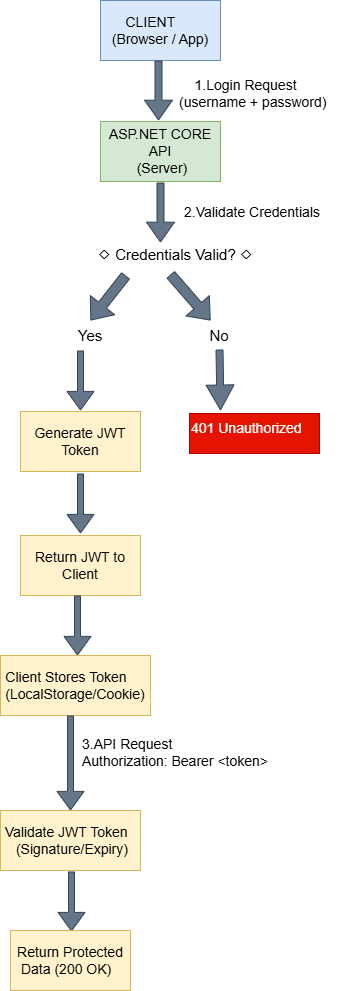
How JWT Authentication Works in ASP.NET Core 8
Complete flow:
1. User sends login request with username and password.
2. Server validates credentials.
3. Server generates JWT token.
4. Token is returned to the client
5. Client stores the token (LocalStorage, session, or HttpOnly cookie)
6. Client sends token in the Authorization header:
Authorization: Bearer your_token7. Middleware validates the token (signature, expiration, issuer, audience)
8. Request proceeds if valid; otherwise, server returns 401 Unauthorized
Key point: JWT is stateless, so the server does not need to maintain session data.
Step-by-Step Implementation
Step 1: Create ASP.NET Core 8 Web API Project
- Select ASP.NET Core Web API
- Choose .NET 8
- Authentication type: None
Step 2: Install Required NuGet Package
Install:
Install-Package Microsoft.AspNetCore.Authentication.JwtBearer -Version 8.0.0This package allows ASP.NET Core 8 to validate JWT tokens.
Step 3: Add JWT Configuration in appsettings.json File
"Jwt": {
  "Key": "ThisIsMySuperSecretKeyForJwtAuthentication2024!@#",
  "Issuer": "JwtAuthDemo",
  "Audience": "JwtAuthDemoUsers",
  "DurationInMinutes": 60
}In production, store the key in environment variables.
Now let’s configure the services required for JWT Authentication in ASP.NET Core 8 inside Program.cs.
Step 4: Configure JWT Authentication in Program.cs
using Microsoft.AspNetCore.Authentication.JwtBearer;
using Microsoft.IdentityModel.Tokens;
using Microsoft.OpenApi.Models;
using System.Text;

var builder = WebApplication.CreateBuilder(args);

builder.Services.AddControllers();

builder.Services.AddEndpointsApiExplorer();
builder.Services.AddSwaggerGen(options =>
{
    options.SwaggerDoc("v1", new OpenApiInfo
    {
        Title = "JWT Authentication API",
        Version = "v1"
    });
    options.AddSecurityDefinition("Bearer", new OpenApiSecurityScheme
    {
        Name = "Authorization",
        Type = SecuritySchemeType.Http,
        Scheme = "bearer",
        BearerFormat = "JWT",
        In = ParameterLocation.Header,
        Description = "Enter JWT Token like: Bearer {your token}"
    });

    options.AddSecurityRequirement(new OpenApiSecurityRequirement
    {
        {
            new OpenApiSecurityScheme
            {
                Reference = new OpenApiReference
                {
                    Type = ReferenceType.SecurityScheme,
                    Id = "Bearer"
                }
            },
            Array.Empty<string>()
        }
    });
});
builder.Services.AddAuthentication(options =>
{
    options.DefaultAuthenticateScheme = JwtBearerDefaults.AuthenticationScheme;
    options.DefaultChallengeScheme = JwtBearerDefaults.AuthenticationScheme;
})
.AddJwtBearer(options =>
{
    options.TokenValidationParameters = new TokenValidationParameters
    {
        ValidateIssuer = true,
        ValidateAudience = true,
        ValidateLifetime = true,
        ValidateIssuerSigningKey = true,
        ValidIssuer = builder.Configuration["Jwt:Issuer"],
        ValidAudience = builder.Configuration["Jwt:Audience"],
        IssuerSigningKey = new SymmetricSecurityKey(
            Encoding.UTF8.GetBytes(builder.Configuration["Jwt:Key"])),
        ClockSkew = TimeSpan.Zero
    };
});

builder.Services.AddAuthorization();

var app = builder.Build();

// Enable Swagger (Development Only)
if (app.Environment.IsDevelopment())
{
    app.UseSwagger();
    app.UseSwaggerUI();
}

app.UseHttpsRedirection();

app.UseAuthentication();
app.UseAuthorization();

app.MapControllers();

app.Run();
Step 5: Create User Model
First, create a new folder named Models in your project. Then, inside the Models folder, add a new class called User.
public class User
{
    public string Username { get; set; }
    public string Password { get; set; }
}Next, we will generate a token for JWT Authentication in ASP.NET Core 8 using an AuthController.
Step 6: Create Login API to Generate JWT Token
Next, create a new controller called AuthController inside the Controllers folder of your project.
- Open the Controllers folder.
- Add a new controller named AuthController.
Add given code in AuthController:
using Microsoft.AspNetCore.Mvc;
using Microsoft.IdentityModel.Tokens;
using System.IdentityModel.Tokens.Jwt;
using System.Security.Claims;
using System.Text;

[Route("api/[controller]")]
[ApiController]
public class AuthController : ControllerBase
{
    private readonly IConfiguration _configuration;

    public AuthController(IConfiguration configuration)
    {
        _configuration = configuration;
    }

    [HttpPost("login")]
    public IActionResult Login([FromBody] User loginUser)
    {
        if (loginUser.Username == "admin" && loginUser.Password == "123")
        {
            var claims = new[]
            {
                new Claim(ClaimTypes.Name, loginUser.Username),
                new Claim(ClaimTypes.Role, "Admin")
            };

            var key = new SymmetricSecurityKey(
                Encoding.UTF8.GetBytes(_configuration["Jwt:Key"]));

            var creds = new SigningCredentials(key, SecurityAlgorithms.HmacSha256);

            var token = new JwtSecurityToken(
                issuer: _configuration["Jwt:Issuer"],
                audience: _configuration["Jwt:Audience"],
                claims: claims,
                expires: DateTime.Now.AddMinutes(60),
                signingCredentials: creds);

            return Ok(new
            {
                token = new JwtSecurityTokenHandler().WriteToken(token)
            });
        }

        return Unauthorized();
    }
}To secure endpoints in JWT Authentication in ASP.NET Core 8, we use the [Authorize] attribute.
Step 7: Protect API Endpoints
To secure your API endpoints, use the [Authorize] attribute. This ensures that only authenticated users with a valid JWT token can access the endpoint.
The [Authorize] attribute checks whether the incoming request contains a valid JWT token in the Authorization header.
using Microsoft.AspNetCore.Authorization;

[Authorize]
[ApiController]
[Route("api/[controller]")]
public class ProductController : ControllerBase
{
    [HttpGet]
    public IActionResult Get()
    {
        return Ok("This is protected data.");
    }
}- Only authenticated users can access
- Invalid or missing token → 401 Unauthorized
Step 8: Implement Role-Based Authorization
To restrict access based on user roles, use the Roles property inside the [Authorize] attribute.
[Authorize(Roles = "Admin")]
[HttpDelete("{id}")]
public IActionResult Delete(int id)
{
    return Ok("Deleted successfully");
}- Only Admin users can delete records.
- If a logged-in user does not have the required role →
403 Forbidden - If the token is missing or invalid →
401 Unauthorized
Important Note:
Role-based authorization works only if the role claim is included inside the JWT token when generating it.
Example while creating the token:
new Claim(ClaimTypes.Role, "Admin")Without adding the role claim, role-based authorization will not work — even if the user is authenticated.
Multiple roles example:
[Authorize(Roles = "Admin,Manager")]Step 9: Security Best Practices
- Use HTTPS for all endpoints
- Store secrets in environment variables
- Use strong signing keys
- Implement refresh tokens
- Hash passwords securely
- Protect against brute-force attacks
- Log failed login attempts
- Prefer ASP.NET Core Identity for complex apps
- Optional: Rate limiting
JWT vs Cookies vs OAuth2
| Feature | JWT | Cookies | OAuth2 |
|---|---|---|---|
| Stateless | Yes | No | Yes |
| Scalability | Yes | No | Yes |
| Mobile-friendly | Yes | No | Yes |
| Complexity | Medium | Low | High |
Testing JWT Authentication in Swagger
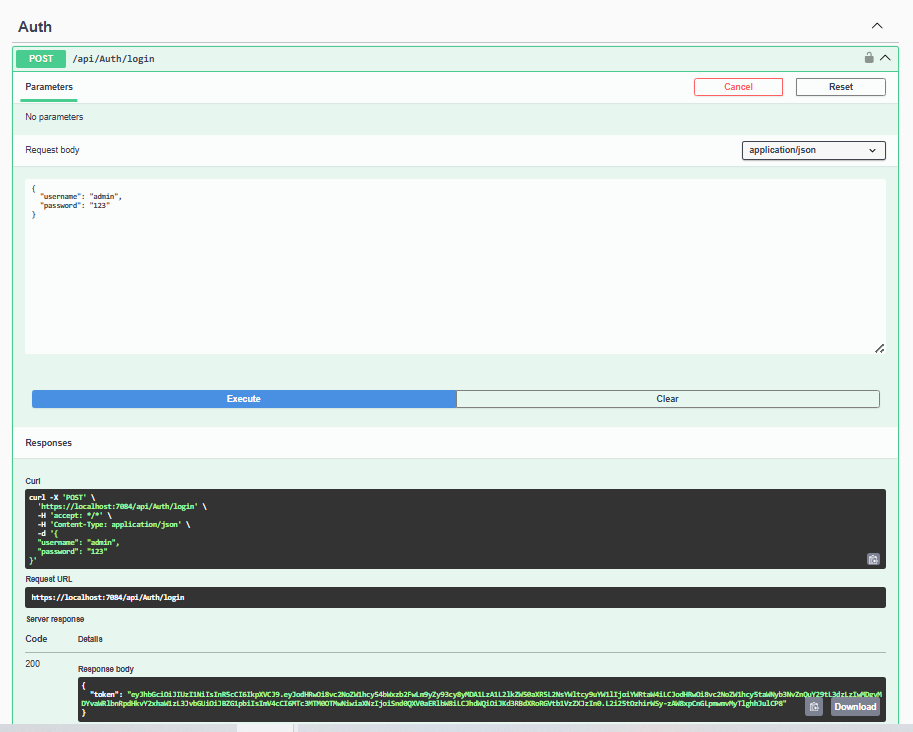
Let’s test JWT Authentication in ASP.NET Core 8 using Swagger UI.
1. Run the application by pressing F5.
2. Call the Login API (POST /api/Auth/login).
3. Copy the returned JWT token from the response.
4. Click the Authorize button in Swagger.
5. In the authorization popup, enter the token in this format:
Bearer your_token_hereExample:
Bearer eyJhbGciOiJIUzI1NiIsInR5cCI6IkpXVCJ9...6. Click Authorize, then click Close.
7. Now test the protected endpoints.
Common Errors and Troubleshooting
| Status Code | Issue | Solution |
|---|---|---|
| 401 Unauthorized | Token missing or expired | Include valid token in header |
| 403 Forbidden | Role mismatch | Check user role |
| Invalid signature | Token tampered | Use correct signing key |
| Wrong audience/issuer | Token from another app | Match configuration |
| Clock drift | Token valid but rejected | Sync server/client time |
Best Practices for Production
- Use environment variables for secret key
- Use HTTPS
- Implement refresh tokens
- Hash passwords
- Use ASP.NET Core Identity for real apps
- Set reasonable expiration time
FAQ
Q1: Can JWT tokens be hacked?
A: Only if the secret key is compromised. Always use HTTPS and strong keys.
Q2: Should JWT be stored in LocalStorage?
A: LocalStorage works for SPAs, but HttpOnly cookies are safer against XSS.
Q3: How to invalidate JWT before expiration?
A: Use short-lived access tokens and maintain a server-side blacklist or revoked refresh tokens.
Q4: What is a refresh token?
A: Allows obtaining a new access token without re-login.
Q5: Why JWT over cookies?
A: Stateless, scalable, mobile-friendly, works in distributed systems.
Conclusion
In this tutorial, we successfully implemented JWT Authentication in ASP.NET Core 8 with token generation and role-based authorization.
You now know:
- How authentication works
- How authorization works
- How JWT tokens are generated
- How to protect API endpoints
Related Blogs You Might Like
- Difference between .NET framework, .NET Core & .NET 8 – Learn different .NET versions.
- What is .NET Full Stack Development? Beginner Guide – Understand the full .NET full stack development.
- What Is Web API in .NET? Explained Simply (ASP.NET Core Web API) – Understand and learn web API.
- What Is ASP.NET MVC Framework? Architecture, Features, Life Cycle & Example – Learn ASP.NET MVC