
When you start learning ASP.NET Core and building Web APIs, everything works perfectly on your local machine. But sooner or later, you probably face the same question every developer hits how do I deploy this application so others can actually use it? Running a project locally is one thing, making it available to real users on the internet is another.
That’s usually when Azure for .NET developers comes into the picture. At first, it might seem like just “some cloud platform,” but it’s much more than that. Azure is Microsoft’s cloud platform, and for .NET developers, it feels like a natural extension of the tools we already use. Instead of worrying about servers, infrastructure, or scaling, Azure provides managed services that let you focus on your application and deliver it reliably to users.
Think about it this way: you build your ASP.NET Core app on your laptop, test it, and it works. But your laptop can’t handle thousands of users or stay online 24/7. Azure handles all of that for you hosting your application, connecting databases, securing APIs, and managing real-world traffic efficiently.
In today’s development environment, understanding Azure is almost as essential as knowing ASP.NET Core itself. Companies expect developers to understand not only coding, but also deployment, cloud services, and application management in production environments.
In this ultimate getting started guide, I’ll walk you through Azure from a practical .NET developer’s perspective the services to focus on first, how it integrates with ASP.NET Core, and a clear roadmap to move from development to real-world cloud deployment confidently.
What Is Microsoft Azure?
Microsoft Azure is Microsoft’s cloud platform that provides all the tools you need to build, deploy, and manage applications in the cloud. For .NET developers, Azure is especially powerful because it integrates seamlessly with ASP.NET Core, .NET 8, SQL Server, and other Microsoft technologies.
Cloud computing means using computing resources like servers, storage, and databases over the internet instead of running them on your own machine. Instead of buying and maintaining physical hardware, the cloud lets you rent these resources on demand. For developers, this means you can focus on building applications rather than managing infrastructure.
Hosting your app on Azure is like moving from a personal workstation to a fully managed environment. Azure can handle real-world traffic, scale automatically, and provide essential services such as authentication, storage, and monitoring all without touching physical servers.
Why Azure Is Popular
Azure is popular for several reasons that make it a natural choice for .NET developers:
- Seamless .NET Integration – Works naturally with ASP.NET Core, .NET 8, and SQL Server.
- Wide Range of Services – From cloud databases to AI and analytics tools.
- Global Reliability – Backed by Microsoft’s enterprise-grade infrastructure.
- Scalability – Automatically adjusts resources as your application grows.
- Security – Built-in security and compliance features to protect your apps.
For .NET developers, this combination of reliability, integration, and scalability makes Azure one of the top cloud choices.
Azure Global Data Centers
Azure is available worldwide through a network of hundreds of data centers across multiple regions.
This ensures:
- Fast response times for users no matter where they are.
- High availability and redundancy, reducing downtime.
- Compliance with local regulations, essential for sensitive data.
For example, if your users are mainly in the US and Europe, Azure can host your application close to them, improving performance and reliability.
IaaS, PaaS, and SaaS: Understanding Cloud Service Models
When you start using Azure, you’ll often hear the terms IaaS, PaaS, and SaaS. These describe how much control you have over the cloud infrastructure versus how much Azure manages for you. Understanding these helps you know what’s happening “behind the scenes” when you deploy your ASP.NET Core apps.
1. IaaS – Infrastructure as a Service
- What it is: You get virtual machines, storage, and networking in the cloud. You’re responsible for managing the operating system, runtime, and applications.
- Example in Azure: Azure Virtual Machines, Azure Storage Account
- When to use it: When you need full control over the server, custom setups, or want to run legacy applications that need a specific OS configuration.
2. PaaS – Platform as a Service
- What it is: Azure manages the infrastructure, operating system, and runtime. You only focus on your application code.
- Example in Azure: Azure App Service, Azure SQL Database, Azure Functions
- When to use it: Perfect for deploying ASP.NET Core apps quickly without worrying about servers, updates, or scaling.
3. SaaS – Software as a Service
- What it is: Fully ready-to-use applications hosted in the cloud. You just use the app, no coding or deployment needed.
- Example in Azure: Microsoft 365, Dynamics 365, Power BI
- When to use it: When you only need a tool or service without worrying about infrastructure or app development.
Quick Comparison Table
| Cloud Model | You Manage | Azure Examples | Best For |
|---|---|---|---|
| IaaS | OS, runtime, apps | Virtual Machines, Storage | Full control, custom setups |
| PaaS | Only app code | App Service, SQL Database, Functions | Deploy apps quickly with minimal maintenance |
| SaaS | Nothing | Microsoft 365, Power BI | Use ready-made software without coding |
- Tip for .NET Developers: Most beginner projects and tutorials use PaaS — it’s simple, reliable, and scales automatically.
Why Should .NET Developers Learn Azure?
Azure Is Built by Microsoft
One of the biggest advantages of Azure for .NET developers is that it’s built by Microsoft. This means it’s designed to work seamlessly with the tools and frameworks you already know, like ASP.NET Core, .NET 8, and SQL Server. You don’t have to worry about compatibility issues or forcing different technologies to work together everything just fits.
Best Integration with ASP.NET Core
Azure provides first-class integration with ASP.NET Core applications. You can easily deploy your Web APIs, connect databases, set up authentication, and even scale your apps with just a few clicks. If you want, check out my guide on How to create ASP.NET Core 8 Web API – Step-by-Step CRUD for a practical example of building APIs that you can later host on Azure.
High Demand in Jobs
Companies are looking for developers who not only know how to write .NET code but also understand how to deploy and manage applications in the cloud. Knowledge of Azure for .NET developers can significantly increase your chances of landing high-paying jobs, especially roles that involve cloud or full-stack development. If you’re curious about securing secure APIs in your projects, you might also find my post on How to Implement JWT Authentication in ASP.NET Core 8 Web API very useful.
Required for Full-Stack .NET Roles
Many full-stack .NET developer positions now list Azure experience as a requirement. Knowing Azure allows you to take a project from development to production, deploy apps reliably, and maintain them effectively making you a stronger candidate for modern development teams.
Core Azure Services Every .NET Developer Should Know
If you’re starting with Azure as a .NET developer, it’s important to understand the core services you’ll use Most frequently. These services make building, hosting, and scaling your applications much easier.
1. Azure App Service
Azure App Service is where you can host your ASP.NET Core applications in the cloud. Instead of running your Web API locally, you can deploy it to App Service and make it available to anyone online.
For example, after building your ASP.NET Core 8 Web API – Step-by-Step CRUD project, you can deploy it to App Service in a few clicks. This way, your app is live without managing servers.
2. Azure SQL Database
Azure SQL Database is a managed cloud database for your .NET applications. You don’t need to worry about installing or maintaining SQL Server locally. It’s scalable, secure, and works seamlessly with ASP.NET Core Web APIs.
If you followed my Web API post, connecting it to Azure SQL is the next natural step to make your API cloud-ready.
3. Azure Storage (Blob, Queue, Table)
Azure Storage provides file and data storage for your applications. You can store files, logs, or even messages between services. It’s essential for apps that handle large amounts of data or need cloud-based file management.
4. Azure Functions
Azure Functions is serverless computing. Instead of running an entire application, you can write small functions that respond to events — like sending an email or processing data — without managing infrastructure.
This is especially helpful when combined with your JWT Authentication Web API for small tasks or background jobs.
5. Azure DevOps
Azure DevOps helps with CI/CD pipelines continuous integration and deployment. It automates building, testing, and deploying your applications, so updates go live quickly and safely.
Comparison Table: Core Azure Services
| Azure Service | Purpose | When to Use |
|---|---|---|
| Azure App Service | Host your web apps and APIs in the cloud | When you want your ASP.NET Core app online without managing servers |
| Azure SQL Database | Cloud-based relational database | Store and manage your app’s data easily |
| Azure Storage (Blob, Queue, Table) | Store files, logs, and messages | When your app needs to save files, logs, or share messages between services |
| Azure Functions | Run small pieces of code without servers | For background tasks or event-driven jobs |
| Azure DevOps / GitHub Actions | Automate building and deploying your apps | To make sure updates are tested and live automatically |
| Azure Key Vault | Securely store passwords, keys, and secrets | Keep connection strings and API keys safe |
| Azure Application Insights | Monitor your app’s health and performance | Track errors, performance, and usage in real time |
How Azure Works with ASP.NET Core (Real Example)
If you’re learning Azure for .NET developers, the best way to understand it is through a real example. Let’s say you’ve already built a Web API locally using ASP.NET Core, like in my Step-by-Step CRUD Web API post
Before deploying your ASP.NET Core Web API, let’s understand the overall architecture.
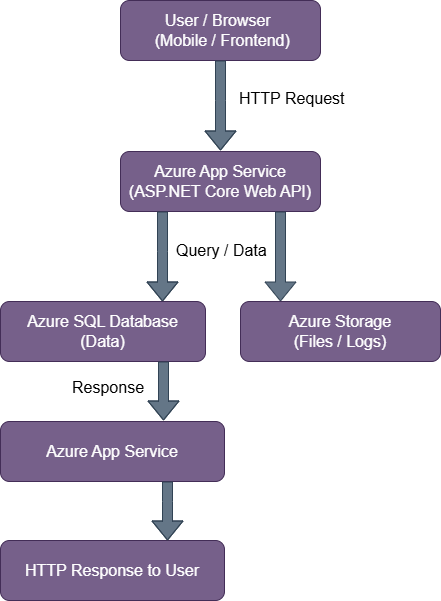
- Figure: Azure Architecture for Hosting an ASP.NET Core Web API using Azure App Service and Azure SQL Database, including optional Azure Storage for files and logs.
Example:
Step 1: Prepare Your Web API
Suppose you have a simple ProductController in ASP.NET Core:
[ApiController]
[Route("api/[controller]")]
public class ProductController : ControllerBase
{
    [HttpGet]
    public IActionResult GetProducts()
    {
        var products = new List<string> { "Laptop", "Tablet", "Phone" };
        return Ok(products);
    }
}This works locally at https://localhost:5001/api/product.
Step 2: Create Azure App Service
- Go to the Azure portal.
- Click Create Resource → Web App → ASP.NET Core.
- Choose your subscription, resource group, and name.
- Click Review + Create.
Your App Service is now ready to host your API.
Step 3: Deploy Your API
- Right-click your project in Visual Studio → Publish → Azure.
- Select your App Service.
- Click Publish.
After a few seconds, your API is live. Now your URL looks like:
https://yourappname.azurewebsites.net/api/productOpen it in a browser, and you’ll see:
["Laptop","Tablet","Phone"]Step 4: Connect Azure SQL Database (Optional)
- Create an Azure SQL Database in the portal.
- Update your appsettings.json connection string:
"ConnectionStrings": {
    "DefaultConnection": "Server=tcp:yourserver.database.windows.net;Database=ProductsDB;User Id=youruser;Password=yourpassword;"
}3. Run migrations, and your API now talks to the cloud database instead of a local one.
Step 5: Add Authentication (Optional)
If your API needs secure access, implement JWT Authentication like in my JWT Authentication post before deploying to Azure. Azure will host the secured API, and only authorized users can access endpoints.
How This Example Works
If you’re learning Azure for .NET developers, it’s easier to understand with a simple flow. Here’s what happens with this Web API example:
- You build your ASP.NET Core Web API on your computer. It works perfectly locally, but only you can access it.
- You create an Azure App Service, which is like a ready-to-go cloud server for your API. This is where your app will live and run 24/7.
- You deploy your API to Azure. Now it has a live URL, so anyone can access it from anywhere in the world.
- If your API needs to store data, you can connect it to Azure SQL Database, so all your data is safe, backed up, and managed by Azure.
- To keep your API secure, you can add JWT Authentication. This ensures only authorized users can access your endpoints.
- When someone requests data from your API:
- Azure receives the request.
- Your API code runs in the cloud.
- It reads or writes data to the database if needed.
- If authentication is enabled, your ASP.NET Core API verifies the JWT token before processing the request.
- The response is sent back to the user instantly.
- Azure automatically scales your API to handle more users and monitors its performance, so your app stays online and fast without extra work.
Azure Learning Roadmap for .NET Developers (2026)
If you’re a .NET developer looking to get started with Azure, following a clear roadmap can save you months of confusion. Here’s a practical step-by-step guide for 2026:
Step 1: Learn Azure Fundamentals
Before diving into coding or deployment, understand the basics of Azure:
- What cloud computing is and why it matters
- Core Azure services like App Service, Azure SQL, Storage, and Functions
- How Azure fits into the .NET ecosystem
Learning the fundamentals will give you a solid foundation to confidently deploy and manage your applications.
Step 2: Deploy Your ASP.NET Core App
Once you understand the basics, it’s time to deploy a real application.
- Take an ASP.NET Core Web API you’ve built locally like the Step-by-Step CRUD Web API and publish it to Azure App Service
- Test your app using the live URL and make sure it works as expected
This step gives you hands-on experience, showing how your apps run in the cloud.
Step 3: Learn Azure SQL
Many applications need a database. Learning Azure SQL allows you to:
- Store and manage your app’s data securely
- Scale the database as traffic grows
- Connect your Web API or other .NET applications to the cloud database
If you’ve followed my Web API example, connecting it to Azure SQL is the next logical step.
Step 4: Learn CI/CD (Continuous Integration and Deployment)
CI/CD automates building, testing, and deploying your applications. For Azure for .NET developers,
this is essential:
- Use GitHub Actions or Azure DevOps pipelines to automate build, testing, and deployment.
- Ensure updates go live safely without downtime
- Learn how to deploy updates to your Web API or other applications automatically
This step saves you time and reduces errors in real-world projects.
Step 5: Prepare for AZ-204 Certification
The AZ-204: Developing Solutions for Microsoft Azure certification is perfect for .NET developers:
- Validates your Azure skills in app deployment, security, storage, and more
- Makes your resume stronger for full-stack or cloud .NET roles
- Reinforces everything you’ve learned in the previous steps
By following this roadmap, you’ll have both practical experience and industry-recognized credentials, making you a confident Azure for .NET developer.
Career Opportunities for Azure .NET Developers
Learning Azure for .NET developers doesn’t just help you deploy apps it opens the door to several exciting career paths in the tech industry. Here’s what you can expect:
1. Cloud Developer Roles
As companies move more applications to the cloud, Azure .NET developers are in high demand.
- Build, deploy, and maintain ASP.NET Core applications in Azure
- Work with cloud databases, storage, and serverless functions
- Automate tasks and monitor performance using Azure tools
These roles often involve creating scalable web APIs, managing cloud infrastructure, and integrating applications with other cloud services.
2. DevOps Roles
With Azure skills, you can also explore DevOps positions:
- Set up CI/CD pipelines using Azure DevOps or GitHub Actions
- Automate deployments and testing for .NET applications
- Monitor app performance and ensure high availability
DevOps roles combine development and operations, making you valuable for modern development teams that rely on cloud-based workflows.
3. Full-Stack .NET Developer Roles
Full-stack .NET developers who know Azure for .NET developers are highly sought after because they can handle both front-end and back-end development, plus cloud deployment.
- Develop both front-end and back-end of applications using ASP.NET Core, Blazor, React, or Angular
- Deploy full applications to Azure, including Web APIs, databases, and front-end apps
- Integrate with cloud services such as Azure SQL Database, Azure Storage, and serverless functions
- Implement authentication and security for end-to-end application protection
- Manage the complete application lifecycle, from local development to cloud deployment and monitoring
- Scale and maintain applications to handle real-world traffic efficiently
These roles let you build complete solutions independently, making you extremely valuable to modern development teams.
Frequently Asked Questions (FAQ)
Here are some common questions .NET developers ask when starting with Azure.
Q1: Do I need Azure to learn ASP.NET Core?
===>
Not at all! You can learn and develop ASP.NET Core apps entirely on your local machine. Azure becomes useful when you want to deploy your app to the cloud so real users can access it.
Q2: Is Azure free for beginners?
===>
Yes! Microsoft offers a free Azure account with $200 credit for the first 30 days and some free services every month. It’s perfect for testing apps, learning, and small projects.
Q3: Which Azure services should I start with as a .NET developer?
===>
Start simple:
- Azure App Service to host your web APIs
- Azure SQL Database for your app’s data
- Azure Storage for files or logs
- Later, explore Azure Functions, DevOps, and Application Insights as you get more confident.
Q4: Do I need to know Azure to get a .NET developer job?
===>
It depends on the role. Many full-stack or cloud-focused .NET positions expect at least basic knowledge of Azure. Knowing how to deploy, scale, and monitor apps in Azure gives you a big advantage.
Q5: How much does it cost to host a small ASP.NET Core app on Azure?
===>
For a small app, costs can be as low as $20–$30 per month, or even free if you stay within Azure’s free tier. Costs increase if you scale up or add more services.
Q6: Can I deploy multiple APIs and apps on the same Azure account?
===>
Absolutely. You can host multiple apps, databases, and storage accounts under one subscription. Just keep an eye on your resource usage to avoid unexpected costs.
7. Is Azure only for Windows and .NET?
===>
No! Azure is cross-platform. You can host Linux apps, Node.js, Python, Java, and more. But for .NET developers, Azure has seamless integration, making it easier to get started.
8. Q8: What’s the best way to learn Azure as a .NET developer?
===>
Step by step:
- Learn Azure fundamentals (cloud basics, services).
- Deploy a small ASP.NET Core Web API.
- Connect it to Azure SQL Database.
- Explore storage, serverless functions, and monitoring.
- Try CI/CD with Azure DevOps.
Conclusion
Learning Azure for .NET developers isn’t just a nice-to-have skill anymore — it’s essential for anyone serious about modern web development. When you know how to deploy ASP.NET Core applications, connect to Azure SQL databases, secure APIs with JWT Authentication, and scale your apps in the cloud, you gain real-world skills that employers are actively looking for.
Following the roadmap we shared from Azure fundamentals, deploying your Web API, exploring Azure SQL, mastering CI/CD pipelines, to preparing for the AZ-204 certification gives you both hands-on experience and professional credibility.
Whether you’re building your first ASP.NET Core Web API or implementing JWT Authentication for a secure application, Azure lets you take your projects from your local machine straight into the cloud, accessible to real users worldwide.
Investing time in Azure for .NET developers opens doors to full-stack roles, cloud development, and DevOps positions, all with excellent salary potential. By combining practical projects with certifications, you’ll not only learn cloud deployment but also position yourself as a highly competitive candidate in today’s tech job market.
Start small, focus on real projects, and gradually explore advanced Azure services. With patience and practice, you’ll confidently build, deploy, and scale applications and truly master Azure as a .NET developer.
- Difference between .NET framework, .NET Core & .NET 8 – Learn different .NET versions.
- What is .NET Full Stack Development? Beginner Guide – Understand the full .NET full stack development.
- What Is Web API in .NET? Explained Simply (ASP.NET Core Web API) – Understand and learn web API.
- What Is ASP.NET MVC Framework? Architecture, Features, Life Cycle & Example – Learn ASP.NET MVC
- How to Implement JWT Authentication In ASP.NET Core 8 Web API (Step-by-Step) – JWT Authentication
- Learn How to create ASP.NET Core 8 Web API – Step-by-Step CRUD with SQL Server & EF Core – CRUD Operation in .NET Core Web API
- How to Implement Caching in ASP.NET Core 8 Web API (Types & Examples) – Caching for Application performance improvement.
- How to Optimize ASP.NET Core 8 Web API Performance (Best Practices Guide) – Optimize Application Performance.